Where this came from
I should probably start by saying that I'm not a software engineer. I work in healthcare. I code for fun, which is a slightly embarrassing thing to admit given how much time I've spent doing it lately.
A while ago, I wanted to get my notes out of a well-known notetaking application. I'd accumulated years of medical notes, and I wanted to turn them into something more useful. It seemed like a fairly straightforward job.
It wasn't.
After discovering that getting my own documents out of the application was considerably harder than getting them in, I started looking for alternatives. There are some excellent note-taking applications out there, but none quite did what I wanted.
So, in a spectacular failure of proportionality, I decided to build one.
That was supposed to solve a fairly simple problem: I wanted my documents to be actual files that I could keep, move around, and open on whatever computer or tablet I happened to be using.
Then I started thinking about what else had annoyed me about keeping a large collection of technical notes.
Why couldn't I declare a variable on one page and use it in a calculation on another? Why couldn't a reference point to an actual object rather than a bit of text that might or might not still exist? Why couldn't a document tell me when something I'd calculated was out of date?
And if I was going to put an AI assistant in there, why should it just generate text? Why couldn't it understand the structure of the document, look things up, and propose actual edits?
These seemed like reasonable questions.
Unfortunately, answering them required building a surprising amount of infrastructure.
The result is Bookend, a document editor that has thoroughly escaped the scope of its original project.
I've spent a lot of time thinking about how to make it work efficiently, how to keep its behaviour predictable, and how to avoid the usual trap of making software more complicated every time you add a feature.
Some of the solutions are fairly conventional. Others were considerably harder than I expected. A few are things I'm particularly pleased with.
So I thought I'd write about how it works, the problems I ran into, and why I made some of the decisions I did.
The problem with making documents smarter
The trouble with making documents do more than store text is that seemingly simple features have a habit of turning into surprisingly difficult engineering problems.
Take something as innocuous as a variable.
I wanted to be able to declare a value on one page and reference it somewhere else. Perhaps a diagnostic threshold in a clinical reference, or a character's age in a novel. Change the original value, and anything depending on it should know that something has changed.
Easy enough, until the book has 800 pages, thousands of references, and calculations that depend on other calculations.
Now the editor needs to understand relationships between objects that might be hundreds of pages apart. It needs to recognise when a value has changed, work out what depends on it, detect circular references, and tell you when a previously calculated result is no longer trustworthy.
And it needs to do all of this without loading and rendering 800 pages every time you change a number.
That last requirement was particularly important to me. I've never understood why displaying a document should require an application to consume enormous amounts of memory and CPU time. I wanted Bookend to be lightweight, but I wasn't prepared to achieve that by sacrificing functionality or making the interface unpleasant to use.
So I ended up with two requirements that pull in opposite directions: the book needs to behave as one connected computational object, while the interface should only have to worry about the page you're actually using.
Then there's the question of what happens when a calculation becomes outdated.
Most of the time, automatically recalculating a formula sounds sensible. But what if the calculation is expensive? What if it depends on an AI model? What if you open a document six months later and discover that its contents have quietly changed because something ran in the background?
I didn't want that. A document should be able to preserve what it previously calculated, tell you when the result is stale, and let you decide when to refresh it. In particular, opening a book should never unexpectedly trigger an AI inference call.
Making the AI assistant useful introduced another set of problems.
It's relatively easy to connect a language model to a text editor and have it generate paragraphs. But I wanted the assistant to understand the structure of the book. It should be able to find a table, inspect its contents, look up the expression syntax, and propose a formula that remains connected to its source data.
That means the AI needs access to the same underlying document operations as the user. It also means giving it enough freedom to be useful without allowing a hallucinated instruction to quietly wreck a carefully maintained document.
Finally, I wanted all of this to work offline, across different operating systems, without requiring a Bookend account or a proprietary synchronisation service. A book should be a file you own. If you edit it on two devices, the application should make a serious effort to preserve both sets of changes rather than simply allowing the last save to win.
None of these problems is entirely new. Compilers, spreadsheets, databases and distributed systems have been dealing with variations of them for decades. But combining their ideas inside a document editor, while keeping the result small, responsive and approachable, turned out to be an interesting challenge.
I made a few wrong turns along the way. Some features required more architectural work than I expected, and some early implementations worked beautifully until I tried them on my actual, enormous notebook.
But gradually, a consistent approach emerged.
Instead of treating pages as isolated collections of text, Bookend treats the objects inside them as things with identities, types and relationships. Once those foundations are in place, references, calculations, dependency tracking and even AI-assisted editing become different ways of interacting with the same underlying model.
That's the part I find most interesting, and it's where the technical story really begins.
The idea: a chain rather than a feature list
One of the things I gradually realised while building Bookend was that I didn't really want a collection of clever, independent features.
I wanted the features to understand each other.
A calculation should know where its inputs came from. A reference should survive moving a page. The AI assistant should understand the same tables and variables that the editor understands. And if I changed something, the application should have a reasonably good idea of what else might be affected.
The decision that made most of this possible was giving objects stable identities, independent of their names or positions.
That sounds fairly unremarkable. Databases have been doing it forever. But it's surprisingly useful inside a document editor.
For example, I can write a reference like {Budget/R4C2}. That's a human-readable address, but internally the reference resolves to an object ID. I can rename the table, move its page or reorganise the chapter without breaking the link.
Tables add another complication. Insert a row or column and relative R#C# references need to adjust. Delete the thing a formula was pointing at, and the formula should show #REF rather than quietly pointing at something else.
Once references became real relationships between identifiable objects, other features started falling into place.
Backlinks, the whole-book structure map, and the relationship graph for an individual page all use the same underlying model. More importantly, Bookend can track which calculations and derived results depend on which sources.
This is probably the architectural decision I'm happiest with, because it solved several problems that initially looked unrelated.
The idea: a chain rather than a feature list
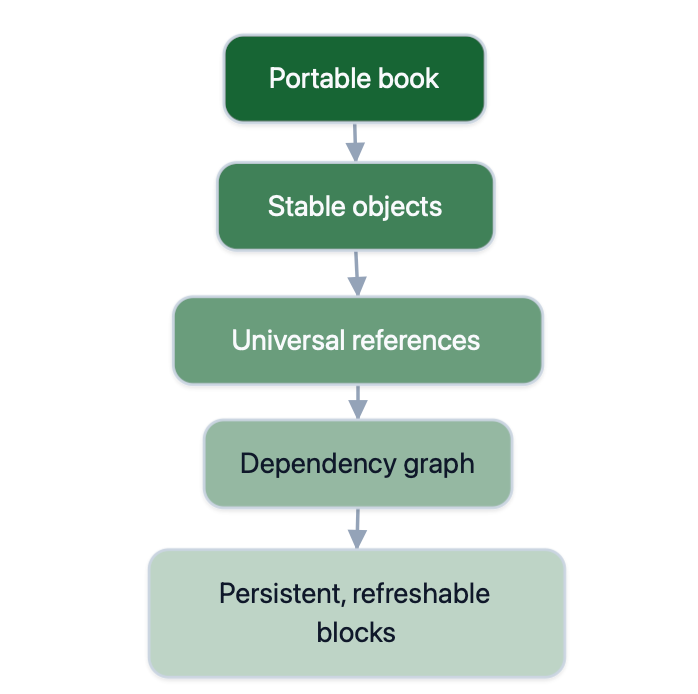
One of the things I gradually realised while building Bookend was that I didn't really want a collection of clever, independent features. I wanted the features to understand each other.
A calculation should know where its inputs came from.
A reference should survive moving a page.
The AI assistant should understand the same tables and variables that the editor understands.
And if I changed something, the application should have a reasonably good idea of what else might be affected.
The decision that made most of this possible was giving objects stable identities, independent of their names or positions. That sounds fairly unremarkable, and databases have been doing it forever. But it's surprisingly useful inside a document editor.
For example, I can write a reference like {Budget/R4C2}.
That's a human-readable address, but internally the reference resolves to an object ID.
I can rename the table, move its page or reorganise the chapter without breaking the link.
Tables add another complication. Insert a row or column and relative R#C# references need to adjust. Delete the thing a formula was pointing at, and the formula should show #REF rather than quietly pointing at something else.
Once references became real relationships between identifiable objects, other features started falling into place. Backlinks, the whole-book structure map, and the relationship graph for an individual page all use the same underlying model.
More importantly, Bookend can track which calculations and derived results depend on which sources. This is probably the architectural decision I'm happiest with, because it solved several problems that initially looked unrelated.
Calculation lives in the prose
I wanted to do calculations inside documents without turning the editor into a spreadsheet or having to insert special calculation blocks everywhere. If I'm writing a technical reference and need to calculate something, I want to write the expression where it belongs in the sentence. So I built a small inline expression language. It works in ordinary text, headings, table formulas, captions and even flowchart labels. For example:
{{VAR price Currency = 19.99 USD}} {{VAR quantity = 12}} Total: {{= price * quantity}}
That renders as $19.99 12 and Total: $239.88. The value system is deliberately small and strict: Number, Integer, String, Boolean, Date, Time, DateTime, DateRange and Currency.
Values reach across the book by address, and a table formula can read from outside its table:
{{Assumptions/price}}: a variable in a named block on this page
{{Section/Chapter/Page/Assumptions/price}}: the same from another page
{{= AVG({{Rainfall/R2C2:R13C2}})}}: an aggregate over a table range
={{Budget/R4C2}} * 12: a table formula reading another table
Failure is loud by design, which is the point of the whole exercise. A typo in a reference is an error, not text that happens to look right:
{{VAR x = Tabel1/R2C2}} #ERROR: unknown reference 'Tabel1' ...
No silent coercion. {{VAR n Integer = 1.8}} fails instead of rounding.
No currency guessing. Adding AUD to USD is an error, and nothing is ever converted.
Errors propagate. Anything reading a broken value says so, and a circular reference is named link by link.
Dates are calendar-aware. Date - Date gives whole days, and DATEADD clamps month ends.
The language has limits you should know about. There are 12 built-in functions, with no ROUND and no DATEDIFF. There is no scripting and no code-running block, and that is a deliberate non-goal. If you want a general programming environment inside your notes, this is not it. "Programmable" here means declarative and bounded.
Stale, not silently recomputed
This is one of those features that sounded simple until I started thinking about what it should actually mean.
Suppose I've calculated something in a document and then change one of its inputs.
Should Bookend immediately recalculate it?
For a simple multiplication, probably. But what if the result depends on several other calculations? What if it was produced by an AI model? What if I specifically want to preserve the result that existed when I wrote the document?
I eventually settled on a rule: opening a book should never unexpectedly execute its calculations or AI workflows.
Instead, expressions, table formulas and computing blocks have a state: Clean or Stale.
When something changes, Bookend marks the dependent results as stale, including dependencies several steps removed from the original change.
The previous result stays visible, but with a warning border. I can see what it said before, and I can see that I shouldn't necessarily trust it now.
Pressing ↻ refreshes the result. If it depends on other stale calculations, those are refreshed first.
That last detail matters. Otherwise, you could end up with a freshly calculated answer based on outdated intermediate values, which would defeat the purpose.
There are a few exceptions and refinements:
Automatic recomputation is optional. It's off by default, configured per device, and limited to inline expressions and table formulas on the active page. It doesn't automatically run search blocks, calendars or AI.
Clock values are snapshots. An expression such as 2026-11-06 records the date when it was last refreshed, rather than becoming stale every midnight.
Word Count is always current. It updates without producing stale warnings, which is useful for manuscript dashboards.
Conditional dependencies are conservative. An IF expression evaluates only its selected branch, but changing either branch marks the result stale.
The same approach also works with AI-generated values.
For example:⋯ AI not run
This declares a variable whose value comes from a model call.
Importantly, AI(...) isn't an ordinary function in the deterministic expression evaluator. It's a declaration that can trigger a separate, explicitly requested operation.
The result is stored in the book. If Findings changes, the result becomes stale. But the model isn't called again until I ask.
That means reopening a document doesn't unexpectedly spend money, consume GPU time, or replace an answer with something different.
I find that a much more sensible way to incorporate nondeterministic computation into a persistent document.
AI as an operator on the document
I started experimenting with AI integration fairly early, but I didn't want Bookend to become another text editor with a chatbot bolted onto the side.
I already had access to chatbots. What I wanted was an assistant that understood the document it was working on.
That meant giving the model access to the same underlying structures that the editor uses.
Bookend is entirely usable without AI, and it doesn't ship with an AI service. But when you connect a model, the Assistant can use structured tools to inspect the book and propose changes.
There are two broad classes of tools.
Read tools can run without interrupting the user. They include operations such as search_book, read_page, read_blocks, list_tables, list_variables and get_expression_syntax.
Write tools propose changes rather than immediately applying them. Examples include propose_insert_table, propose_create_chart, propose_declare_variable and propose_insert_mirror.
The distinction is intentional.
I'm quite happy for a model to search my notes or inspect a table. I'm less enthusiastic about allowing it to rearrange a manuscript without asking.
Proposed changes appear as cards that I can approve individually or in bulk. Once approved, they're ordinary document edits, so Undo works as expected.
For example, I can ask the Assistant to calculate a column total.
Rather than reading the numbers and returning a static answer, it can inspect the table, look up Bookend's expression syntax and propose a live SUM(...) expression.
That result remains connected to the source table.
It's a small example, but it illustrates the difference between using AI to produce text and using AI to operate on a structured document.
Then I made the workflows reusable
A single model prompt is useful for small tasks, but some of the things I wanted to do were considerably larger.
I might want to gather material from several pages, extract information, classify it, draft a section, critique the draft, revise it and assemble the result.
Trying to do all of that in one enormous prompt is not particularly reliable.
So I built what Bookend calls harnesses: reusable, multi-step AI workflows.
Each step has a kind, such as gather, extract, classify, draft, critique, revise, assemble or render, and a role such as writing, extraction or planning.
The context available to each step is explicit. It might be the current selection, a page, a chapter, the whole book, search results or the output of an earlier step.
You can inspect what context a step received, rather than wondering what the model might have been told.
Harnesses can also decompose larger tasks into smaller ones. A planner proposes subtasks and dependencies, but Bookend validates the plan against configured limits. Read-only tools can be selected within the allowed scope, but that scope cannot silently expand.
If the model can't produce a valid plan, the step runs as a single task instead.
Runs are persistent, too. You can stop, resume or retry a workflow while retaining completed steps. A finished run doesn't decide to execute itself again later.
I spent quite a bit of time thinking about how to make this work with smaller local models, because that's what I use myself and what I expect many technically inclined users will want to use.
Bring your own model
I didn't particularly want to run an AI subscription business. I wanted to build a document editor.
So Bookend lets you configure your own model connections.
You can connect to Ollama running locally or elsewhere on your LAN, use an OpenAI-compatible API with a bearer token, or configure a custom endpoint.
Bookend supports Chat Completions and the Responses interface where available, with automatic detection.
One slightly tedious problem with model endpoints is that they don't all implement the same capabilities consistently. Bookend can retry requests without unsupported optional tuning parameters and remember what worked.
But it won't silently remove a capability that the task actually needs, such as tool calling.
Books store model roles, not the connections or credentials themselves. If I send someone a book containing an AI workflow, they can run it using their own configured models.
Credentials remain in the operating system's secure storage, using Keychain or Android Keystore.
Connections are also classified as Local, Trusted private network or External, and there's a switch that refuses all External traffic.
There are limitations. Responses currently arrive whole rather than streaming, and Bookend doesn't implement every provider's proprietary native protocol. For those services, you use their OpenAI-compatible interface.
But the underlying idea is that the document and its AI workflows shouldn't belong to any particular model provider.
One file, no account, no sync service
This is where the whole project started.
I wanted my documents to be files that I actually owned, rather than content stored inside an application account that might or might not let me export them later.
A Bookend book is a single .bookend file containing its text, tables, images, attachments, templates and AI workflows.
Copy the file and you've copied the book.
There is no Bookend account, no Bookend server and no application-wide database that has to accompany it.
I also decided fairly early that I didn't want to build a cloud synchronisation service.
There are already plenty of services that synchronise files. I didn't see much value in building another one just so my document editor could have its own cloud.
Instead, Bookend works with files stored locally or through compatible operating-system file providers, including services such as iCloud Drive and Dropbox.
That sounds straightforward until you consider what happens when the same file is edited on two devices.
Suppose I open a book on my Mac, make some changes, and then edit an older copy on my iPad before the first change has synchronised.
Eventually, both devices want to save.
Simply allowing the last writer to win would be an effective way to lose work.
I didn't want to build a real-time collaborative editor, complete with operational transformation, CRDTs and all the machinery that entails. My use case was much simpler: one person editing a book across several devices, sometimes offline.
So Bookend detects external modifications and handles conflicts conservatively.
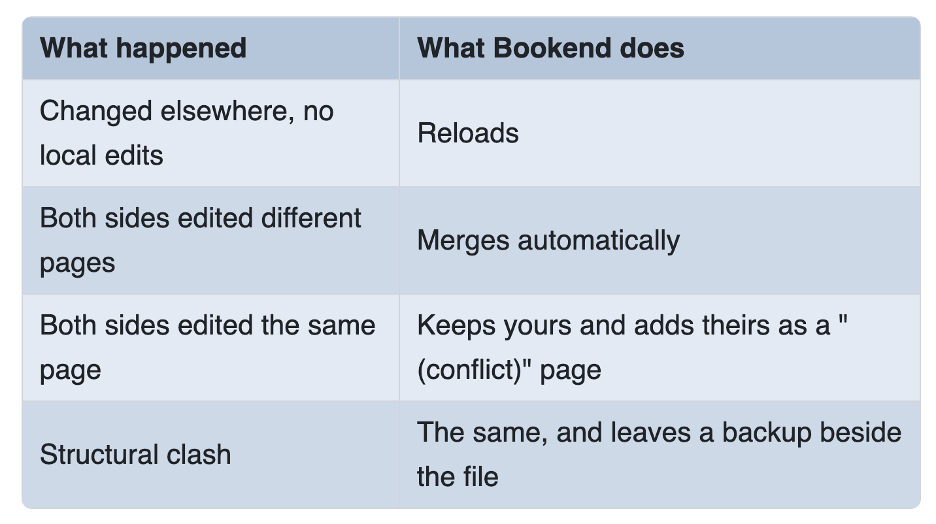
The objective isn't to produce a magically perfect merge in every situation.
It's to avoid silently discarding someone's work.
Bookend also autosaves edits, recovers unsaved work after crashes, and uses atomic, verified saves on macOS before replacing the existing file.
A damaged page shouldn't take down an otherwise readable book, and a file created by a newer, incompatible version is refused rather than being opened and potentially damaged.
There are still some platform-specific limitations. For example, on iPad, Google Drive can open a book but cannot currently save it back to the original file.
And this is conflict-safe synchronisation, not real-time co-editing. If you're looking for several people to edit the same page simultaneously, Bookend isn't designed for that.
There's a trade-off to having one structured file
I should acknowledge something that plain-text enthusiasts will reasonably object to.
A .bookend file isn't a folder of Markdown documents.
You can't just grep through it or review individual changes using ordinary line-oriented Git diffs.
That's a genuine disadvantage for some workflows.
The trade-off is that Bookend can preserve a richer native document model, including typed objects, persistent references, tables, attachments and computational relationships.
For portability outside the application, you can export a page, chapter, section or entire book to PDF, DOCX, EPUB 3, HTML or RTF. Live values are exported as their currently rendered text.
I don't think one storage model is universally better than another. I just wanted a different set of capabilities and was willing to make that trade-off.
Built for books that get large
My own notebook turned out to be a useful, if occasionally unpleasant, test case.
It currently contains 864 pages and roughly 40,000 blocks, with plenty of cross-references.
It's also the reason I became obsessive about performance.
One of my guiding principles was that the cost of editing a paragraph should depend on the paragraph and its dependencies, not on the size of the entire book.
Bookend didn't always live up to that.
At one point, editing a paragraph caused the engine to send 50.4 MB of data to the interface.
For one edit.
This was not an especially elegant arrangement.
I spent a fair amount of time reworking the way the engine and interface communicate, along with the dependency and staleness machinery.
On my real notebook, measured in a debug build across the 1.0 performance refactor, the improvement looked like this:
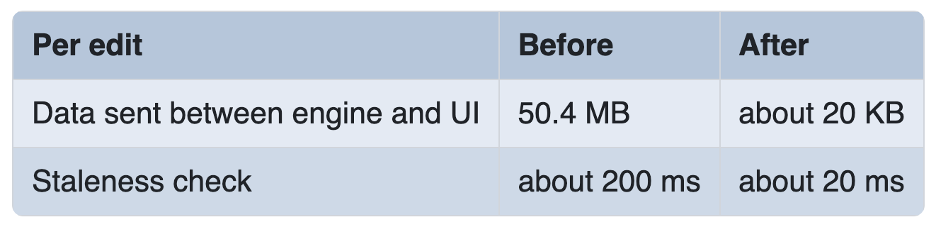
That's approximately a 2,500-fold reduction in transferred data and a tenfold improvement in the staleness check.
The important part isn't just that those particular numbers improved.
It's that I wanted to prevent the same problem from creeping back in.
So Bookend has a scaling test that constructs books with 70 and 700 pages and checks that the work required for an individual edit doesn't grow simply because the book has become ten times larger.
There's an interesting tension here.
Bookend needs to understand variables and dependencies across an entire book, even when those relationships span hundreds of pages.
But the interface shouldn't have to render hundreds of pages just to display one.
Separating the book-wide computational model from the active page's visual representation was one of the more important architectural challenges.
I won't go into all the implementation details here, partly because this article is already becoming long and partly because I've spent enough time making it efficient that I'd like to keep a few tricks to myself.
Why Rust, React and Tauri?
I also wanted Bookend to run on macOS, iOS, Android, Linux and eventually Windows without maintaining five independent document engines.
The core is a Rust library with no dependency on the user-interface framework.
The interface is written in React and TypeScript, packaged using Tauri 2.
All the book's semantics live in Rust. Every mutation is represented as a reversible command.
That separation was important to me because user interfaces and platform frameworks change. I didn't want the document model tied so tightly to one particular interface that replacing it would mean rebuilding the application.
It also means search, references, dependency tracking, the structure map and the Assistant can all operate on the same underlying representation.
There's no collection of separate plugins each maintaining its own slightly different interpretation of the document.
The downside is that Bookend doesn't have a general third-party extension ecosystem.
You can create custom blocks and AI harnesses, but you can't install arbitrary code plugins to add missing functionality.
For some people, that will be a deal-breaker. I understand why.
For me, the priority was to make the core features work together reliably.
How it compares
Inevitably, whenever I describe Bookend to someone technically inclined, the conversation turns to linked-Markdown notebooks.
And that's fair. They're probably its closest relatives.
I like those applications. They solve a real problem, and some have enormous communities and plugin ecosystems.
Many of the things I've described here can also be achieved through combinations of plugins, scripts and external tools.
The distinction I'm trying to make isn't that Bookend invented references, calculations or AI-assisted editing.
It's that I wanted those things to be native parts of one document model.
Here's roughly how I think about the trade-offs:
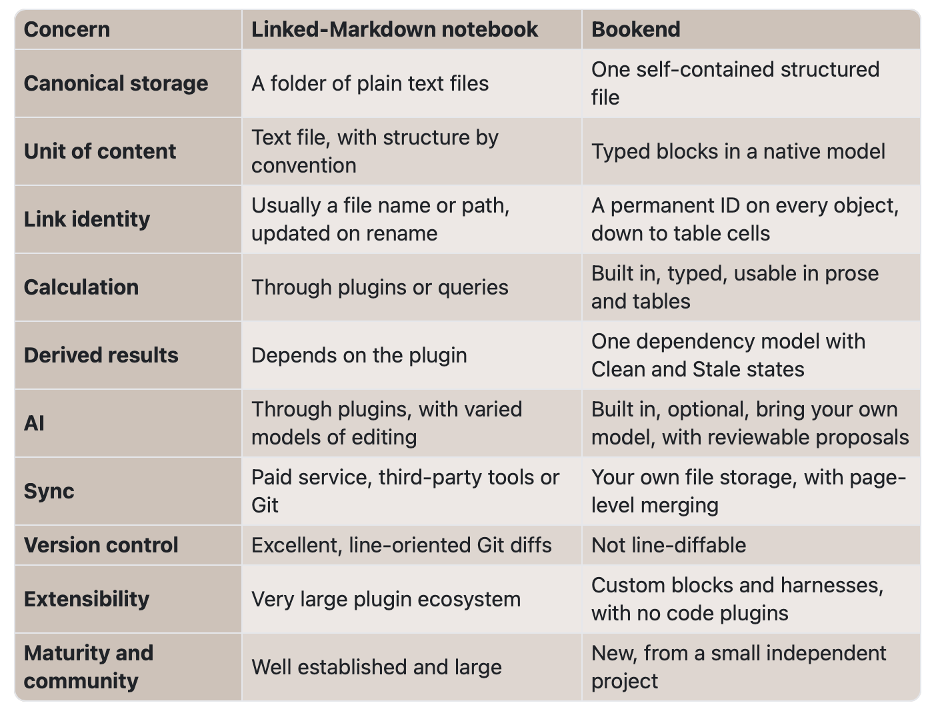
If plain-text files are non-negotiable, your workflow revolves around Git, or you depend on a particular plugin ecosystem, I'd probably recommend sticking with a linked-Markdown notebook.
They're also an excellent fit for collections of relatively small, heavily interlinked notes.
Bookend makes more sense to me when the document itself is substantial and structured.
A clinical reference. A lab notebook. A technical manual. A manuscript. Something where tables, variables, calculations and references need to remain connected and trustworthy as the document grows.
And, naturally, for people who find the idea of a programmable document rather appealing.
Trying it
Bookend is available on the Mac App Store and supports macOS 14 or later. The iOS and iPadOS version has also passed App Store review, with version 1.8.5 submitted for review. Android and Linux are in active development.
The features described here reflect the 1.8.5 build.
If you're curious, the easiest place to start is probably the bundled User Guide.
It's actually a Bookend book, complete with editable examples of the features I've been talking about. You can inspect the variables, change the expressions, break references and see what happens.
There are also templates for things like lab notebooks and novel manuscripts, including dashboards that demonstrate some of the computational features.
None of this requires an AI connection.
If you already run Ollama locally, though, you can configure Bookend to use it and experiment with the Assistant and harnesses using your own models.
I built Bookend because I wanted a particular kind of document editor and couldn't find one.
It has grown into a much larger project than I originally intended, and I'm still finding things I want to improve.
But the underlying idea hasn't changed: I want documents that remain mine, that can do more than hold text, and that don't require an absurd amount of computing power just to exist.
I'm particularly interested in hearing from people who have pushed their own note-taking or document systems well beyond what they were originally designed to do.
If you try Bookend, I'd love to know what works, what doesn't, and especially where you manage to break it.
You can reach me at bookend@wayfarertechnology.org or through the support page.
